
The ServiceNow
killer.
Enterprise service management for the way people work and communicate today. ServiceNow helped organisations digitise their workflows — Nexa is designed to make those workflows disappear behind a simple conversation.
Just say what you need. Nexa figures out the rest.
- Discipline
- Product design & build
- Platform
- Responsive web application
- Surfaces
- Two, one account
- Intelligence
- Nexa, throughout
- Built in
- 17 days
Complexity, made invisible.
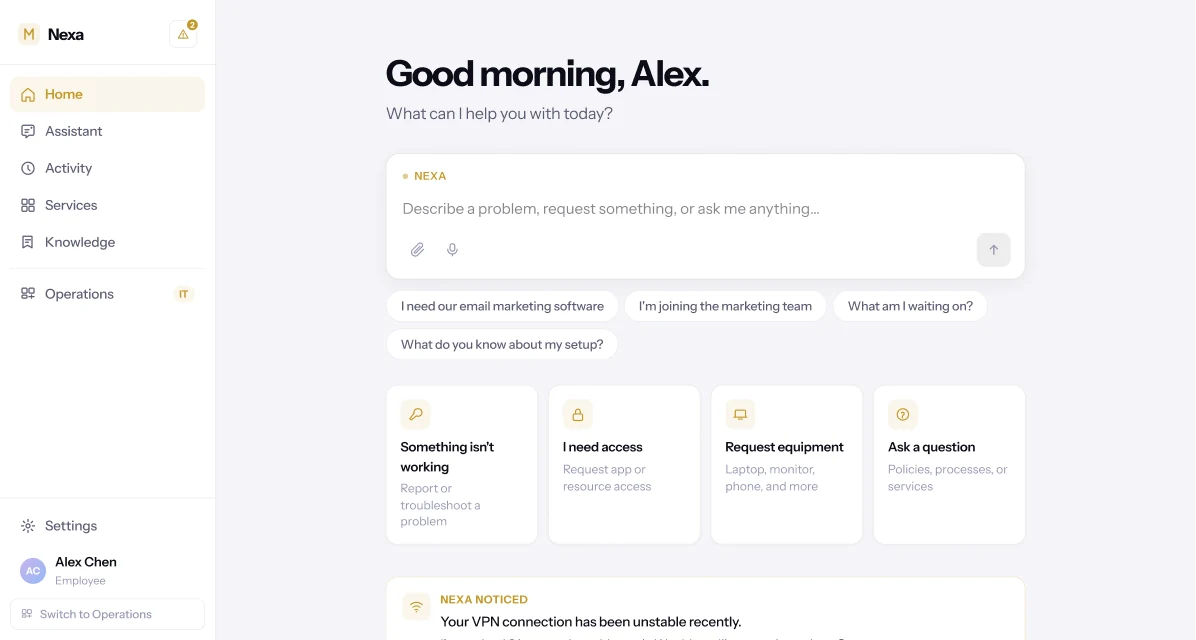
Nexa is a next-generation enterprise service management platform designed to make organisational complexity invisible. It replaces complicated portals, service catalogues, forms and fragmented workflows with a simple, intelligent interface that understands what people need and gets the right work done.
Employees don't need to know which department owns a request, which form to complete, or which workflow to start. They simply communicate naturally. Nexa understands the context, adapts to the way the organisation works, and orchestrates the people, systems and processes required to complete the task.
From employee requests and application access to incidents, security, approvals and operations, Nexa turns complex enterprise workflows into simple conversations and completed outcomes — enterprise service management for the way people actually work and communicate today.
ServiceNow asks you to learn the system. Nexa learns how yours works.
Enterprise service management was built for the way organisations worked twenty years ago: digitise the workflow, put it behind a portal, and train people to use it. It succeeded at the first part. Employees are still expected to do the second, every time — find the right portal, the right category, the right form, the right team, before their actual problem gets a hearing.
None of this is a story about missing software. IT support, access requests, HR services, security, finance and facilities all have a system of record already. What the employee is missing is the map — and as an organisation grows, that navigation burden grows with it, carried entirely by the person with the least context to carry it.
Every task starts with "where do I go?"
Before an employee can ask for anything, they have to work out which department owns the answer.
The org chart is the interface
Six departments, six systems, six mental models — for what the employee experiences as one simple need.
Forms ask what the organisation already knows
Name, department, manager, role — fields an employee fills in that their own company profile could answer.
Approvals are a name and a button
No purpose, no risk, no reasoning — an approver is asked to decide with less context than the system already has.
Security alerts outpace human attention
An unfamiliar login is one signal among hundreds; knowing which ones matter is its own full-time job.
Context disappears when a ticket closes
The next incident starts cold, even when it's the same root cause a team already diagnosed last month.
Same organisational power. A completely different experience.
| Traditional ServiceNow experience | Nexa | |
|---|---|---|
| Starting point | Find the right service | Simply say what you need |
| Navigation | Portals, modules and service catalogues | One intelligent interface |
| Requests | Forms and predefined fields | Natural conversation |
| Incidents | Create and complete a ticket form | Describe the problem naturally |
| Understanding | The user explains and categorises the issue | Nexa gathers context automatically |
| Workflow | The user navigates into the workflow | Nexa finds and orchestrates the workflow |
| Departments | The user often needs to know who owns what | Nexa determines who and what is involved |
| Approvals | A request moves through an approval process | Nexa manages approvals and keeps everyone informed |
| Complex requests | Multiple forms, multiple requests | One request can trigger multiple actions |
| Knowledge | Search for documents and information | Ask questions naturally |
| Incident management | Tickets and queues | AI-assisted investigation and resolution |
| Analytics | Dashboards and metrics | What happened, why, and what to do next |
| Proactive support | Primarily request-driven | Nexa identifies and surfaces issues on its own |
| User experience | Learn how the platform works | The platform adapts to how you work |
What if the organisation had one intelligent interface?
Employees shouldn't need to understand their organisation's internal structure to get something done. That single idea is what Nexa is built around: the employee talks to Nexa, and Nexa carries the complexity underneath.
It changes the shape of the interaction itself — from a chain of navigation decisions to a single conversation that ends in a result.
You shouldn't need training to ask for help.
- I have a problem.
- Where do I go?
- Which portal?
- Which category?
- Which service?
- Which form?
- What information do they need?
- Who owns this?
- Where is my ticket?
"My laptop isn't working."
Nexa understands.
That is it.
Four rules the product never breaks.
Hide complexity, not control
Approvals, permissions and policy checks stay exactly as strict as they need to be. Nexa decides what can happen automatically, what needs more information, and what needs a person — and shows the employee only what they need to know.
Ask less. Understand more.
Most service portals open with a form. Nexa opens with a question, and answers the rest itself: when an employee says they need HubSpot for email campaigns, Nexa already knows their department, role and manager, and only asks what it can't infer.
Move from answers to actions
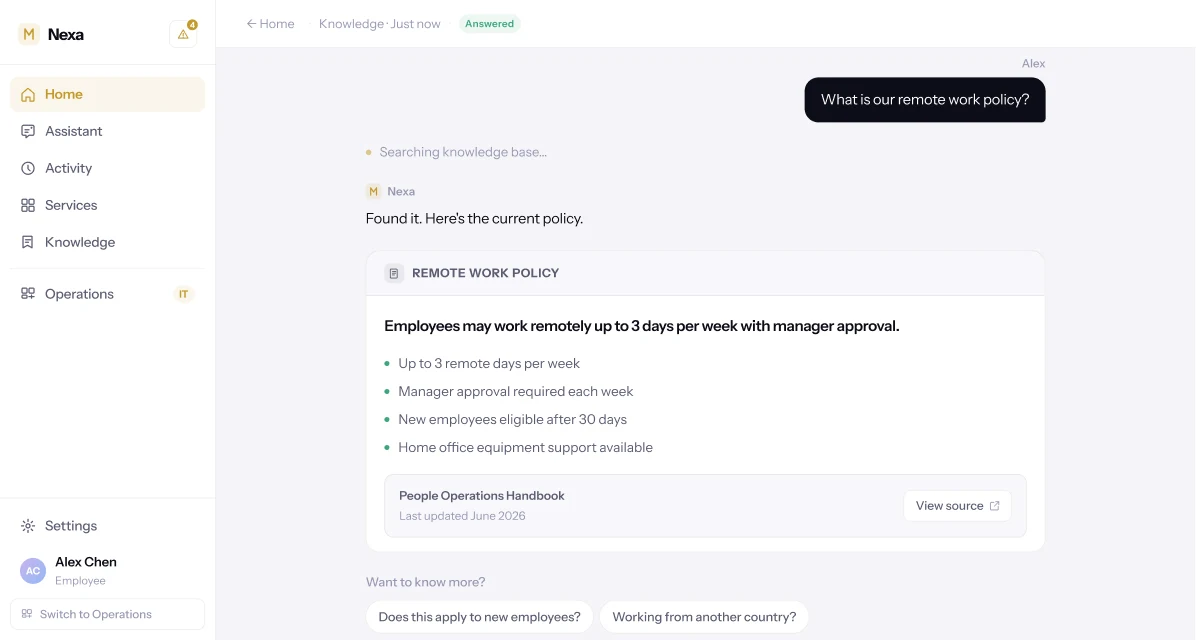
A policy lookup that ends at the answer is a missed step. When Nexa explains the remote work policy, it follows with the action the answer implies — offering to file the request the employee was actually about to make.
The organisation should have memory
Incidents, requests and resolutions shouldn't evaporate when a ticket closes. Nexa treats that history as something to draw on, so a recurring VPN issue is recognised as one, not re-diagnosed from zero.
The user never needs to know which one owns it.
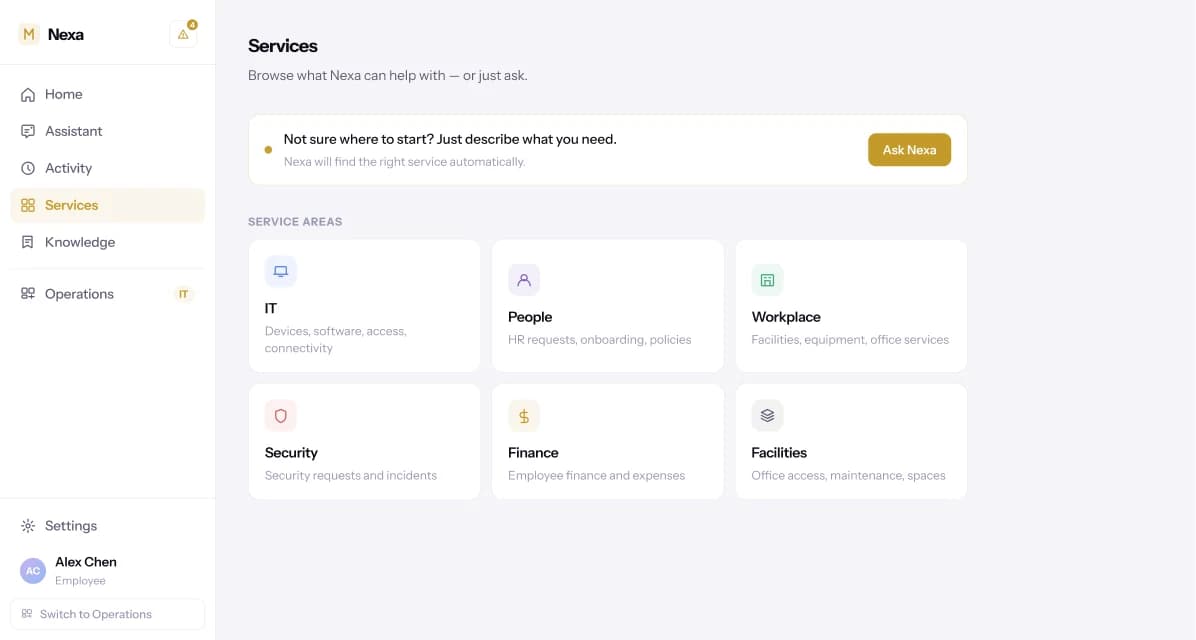
IT
Devices, software, access and connectivity.
People
HR requests, onboarding, policies and team changes.
Workplace
Equipment, meeting rooms and office services.
Security
Identity, access concerns and suspicious activity.
Finance
Expenses, reimbursements and finance-related requests.
Facilities
Office access, maintenance and workspace services.
The ask box is the product, not a corner widget.
Nexa's home opens on one input — "Describe a problem, request something, or ask me anything" — with the questions people actually arrive with already written in as prompts. Four quick-action tiles cover the rest: something isn't working, access, equipment, a question.
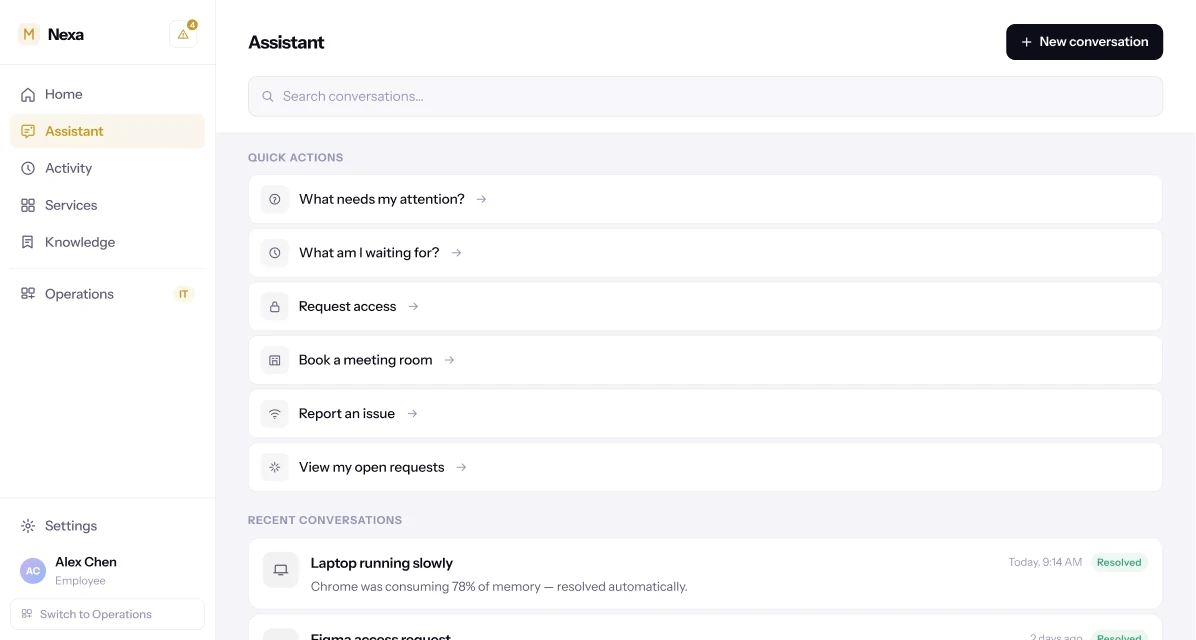
The Assistant view is where a conversation goes to be picked back up: quick actions for what needs attention or what's still pending, and every past exchange, kept and searchable rather than closed and forgotten.
Stop asking employees to understand your internal workflows.
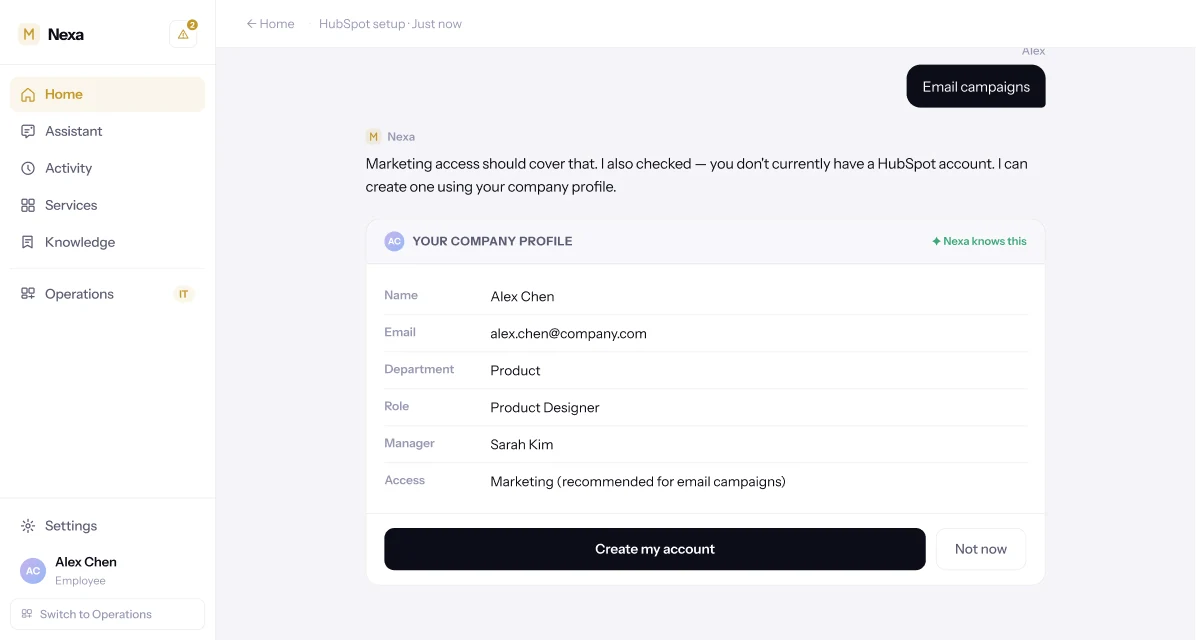
Asked for HubSpot access, Nexa doesn't open an access-request form. It checks whether the organisation uses HubSpot, whether the employee already has an account, and what their role implies about the right access level — then shows its working: the employee's own company profile, with a recommended access level attached.
One question — what will you use it for? — is often the only thing Nexa actually needed to ask. Behind that single exchange: application identification, access policy, approval routing, account creation, provisioning and verification. The employee sees a conversation. The organisation still gets governance.
Browse when you want. Ask when you don't know where to start.
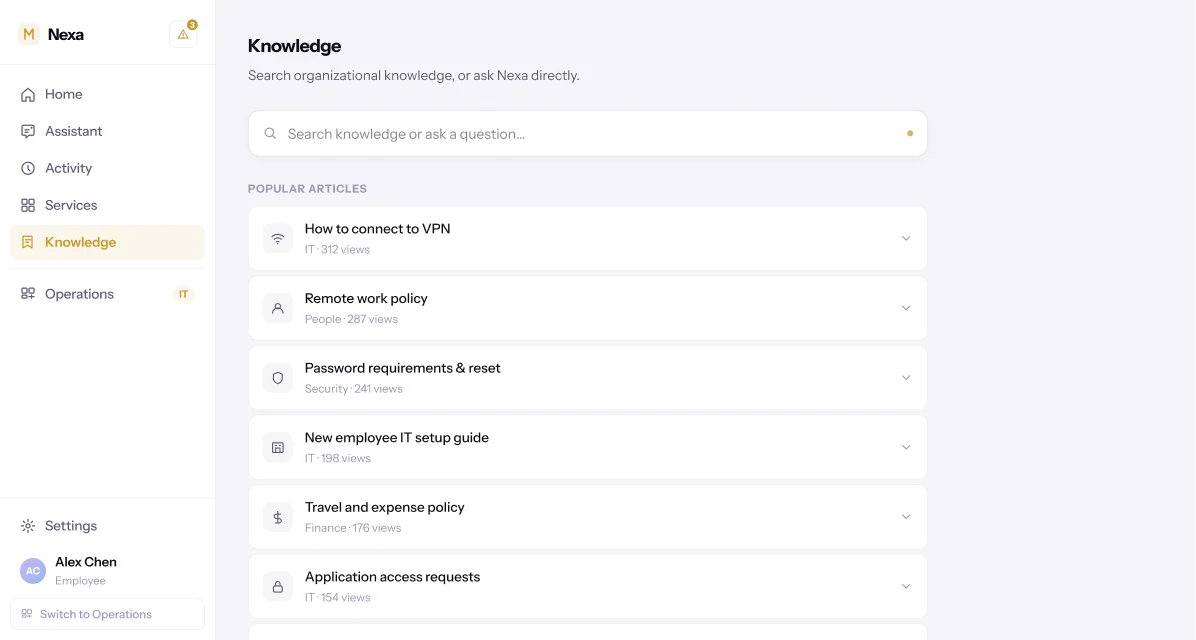
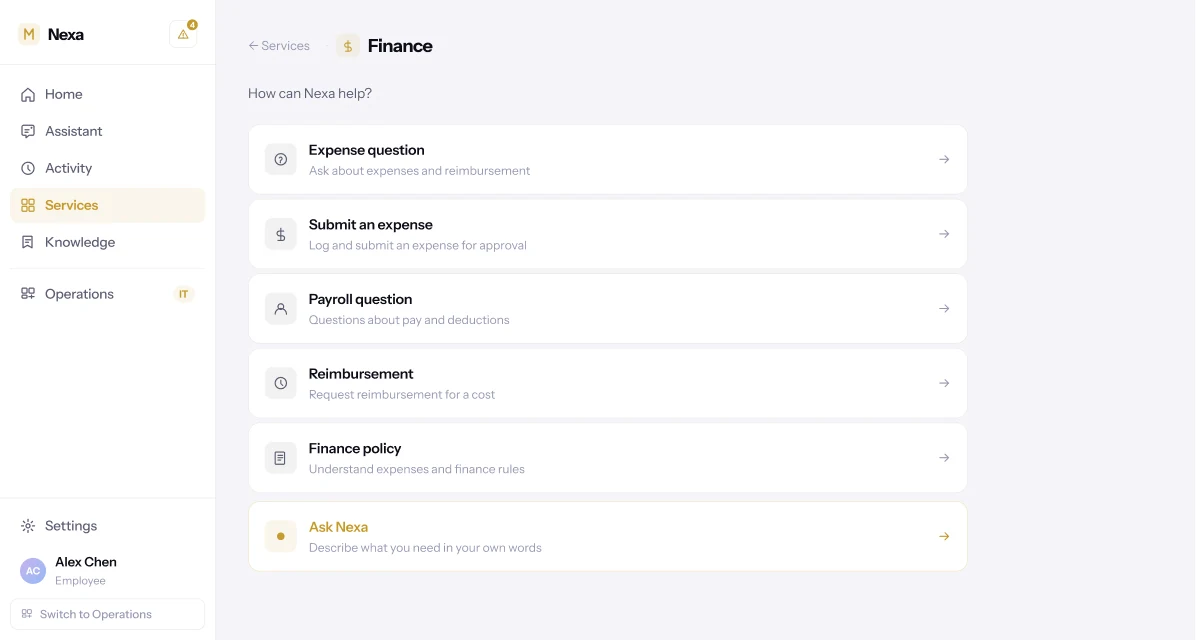
Not every employee wants to type a sentence into a box. The Services view keeps the familiar structure — IT, People, Workplace, Security, Finance, Facilities — for anyone who'd rather browse, with the same "just ask" entry point sitting right above it.
Neither path is the fallback. A department menu and a plain-language request both end at the same place.
The pattern doesn't change by department.
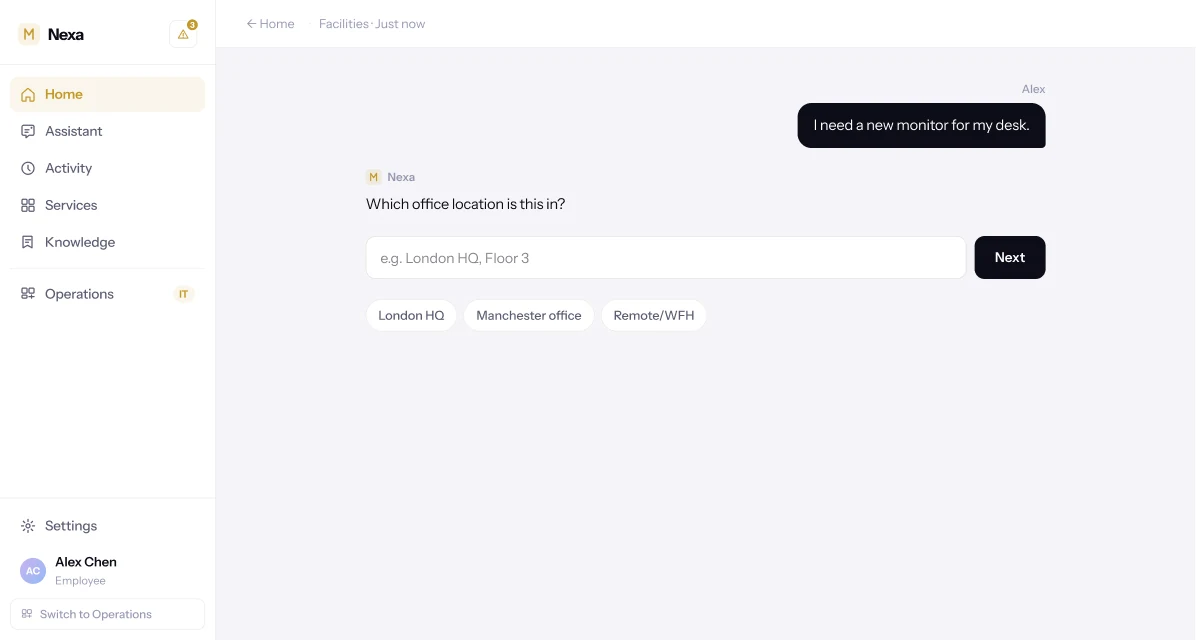
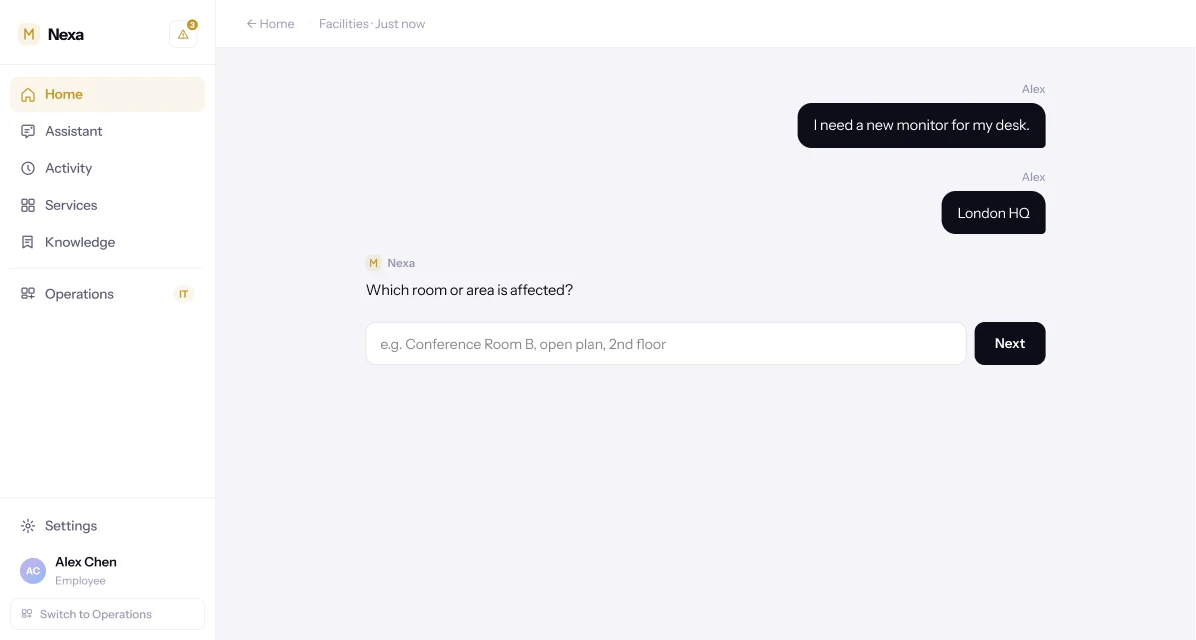
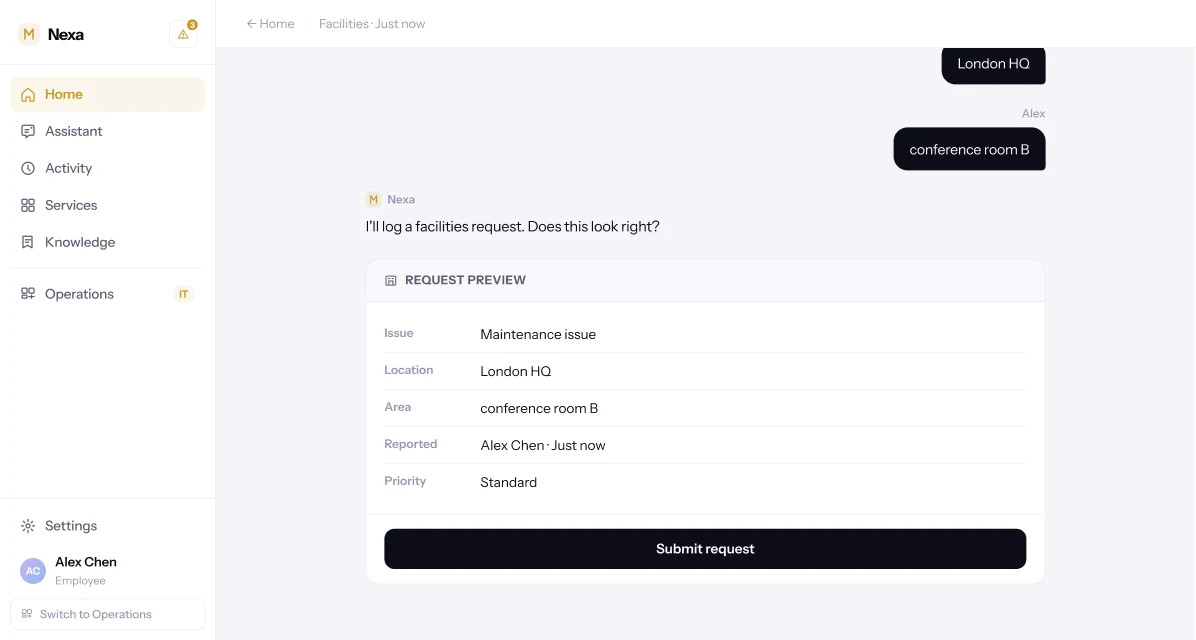
A facilities request — a new monitor, a maintenance issue — follows the same shape as an access request: one question at a time, each answer recapped as a chip, ending in a preview before anything is filed.
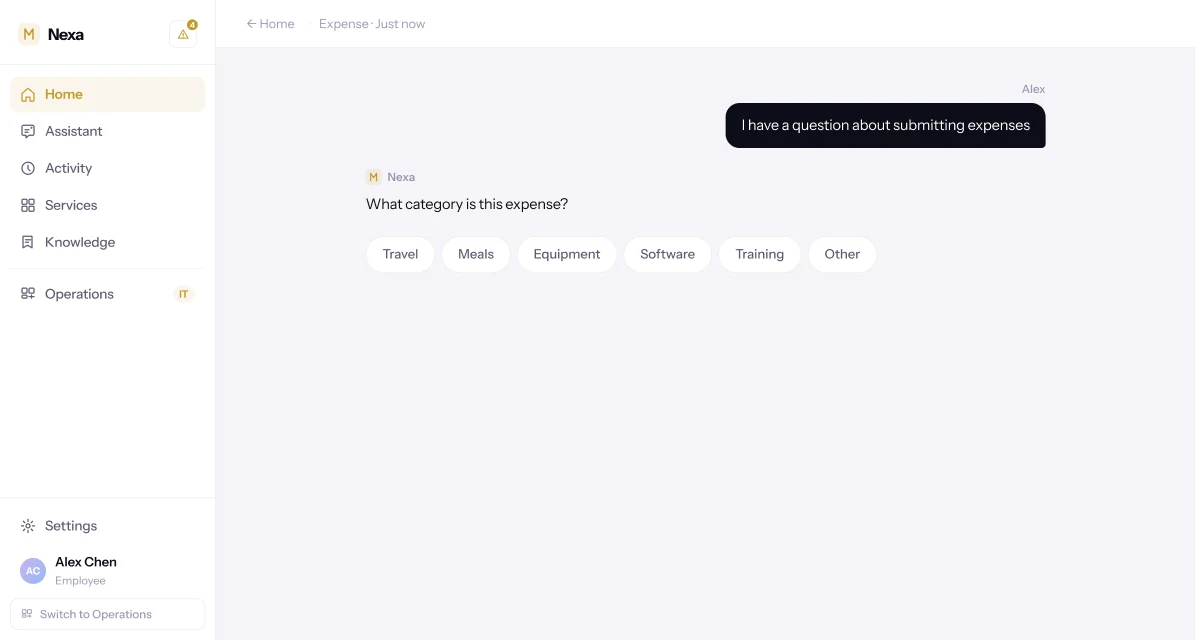
The same three-step rhythm handles an equipment request in Facilities and an expense claim in Finance. Employees learn the pattern once.
A policy answer that stops at the answer is unfinished.
Ask Nexa what the remote work policy says, and it answers in full — the current rule, sourced to the People Operations Handbook, with a link back to it. Most assistants would stop there.
Nexa doesn't. The same turn offers the action the question implied: would you like me to request remote work for Friday? The answer becomes the first step of the thing the employee actually came to do.
Every step recapped. Nothing asked twice.
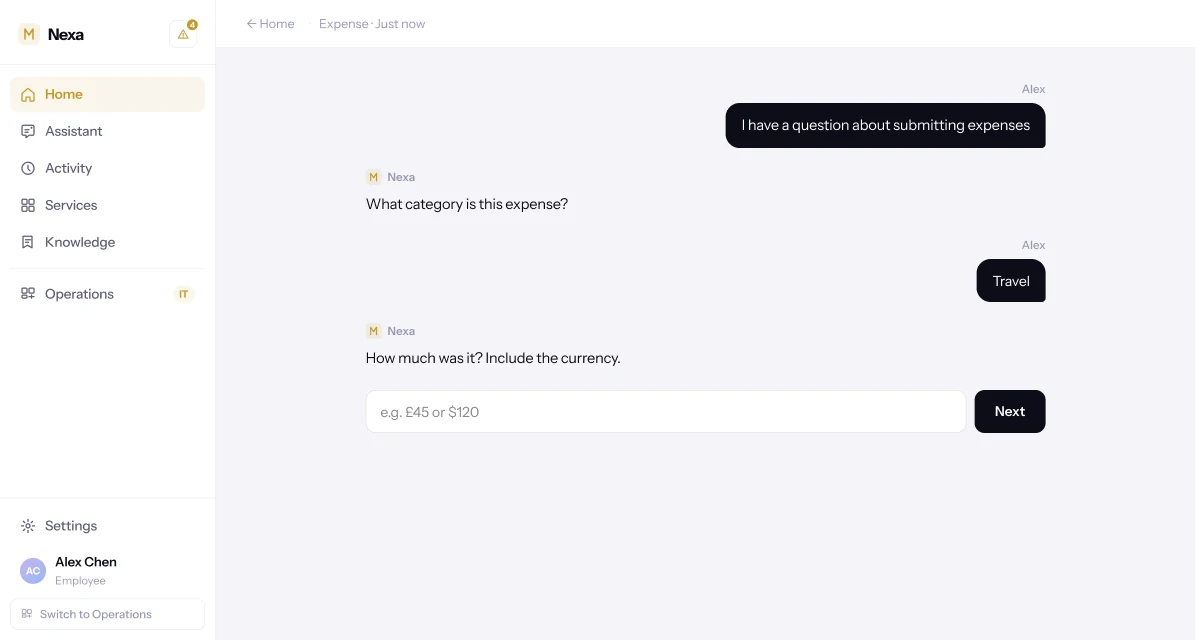
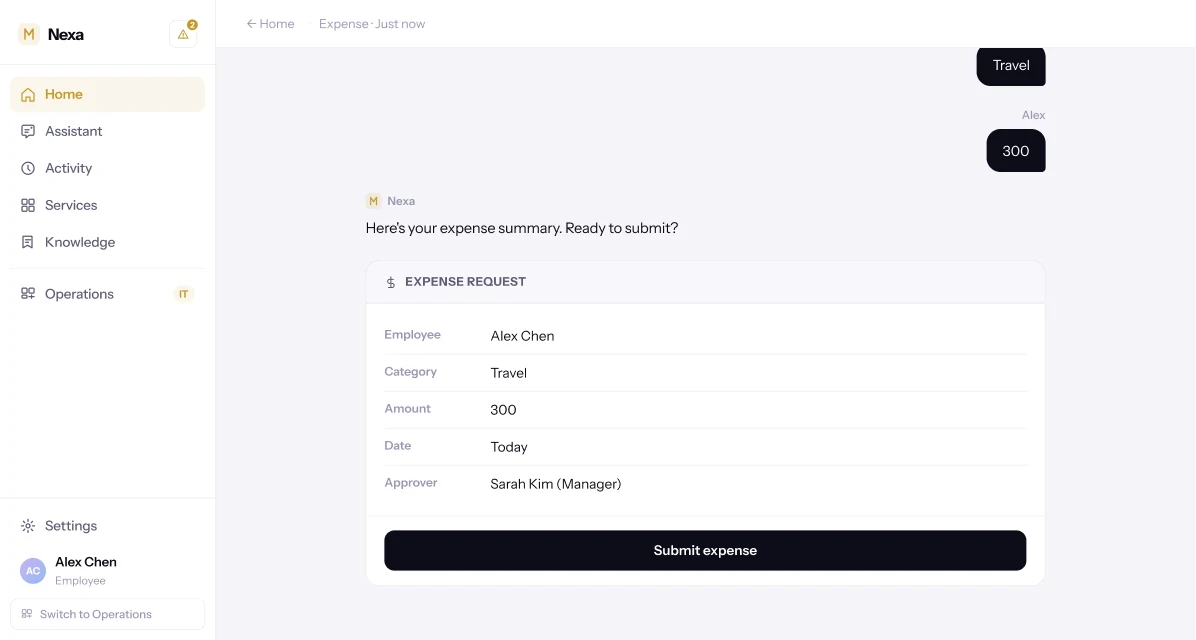
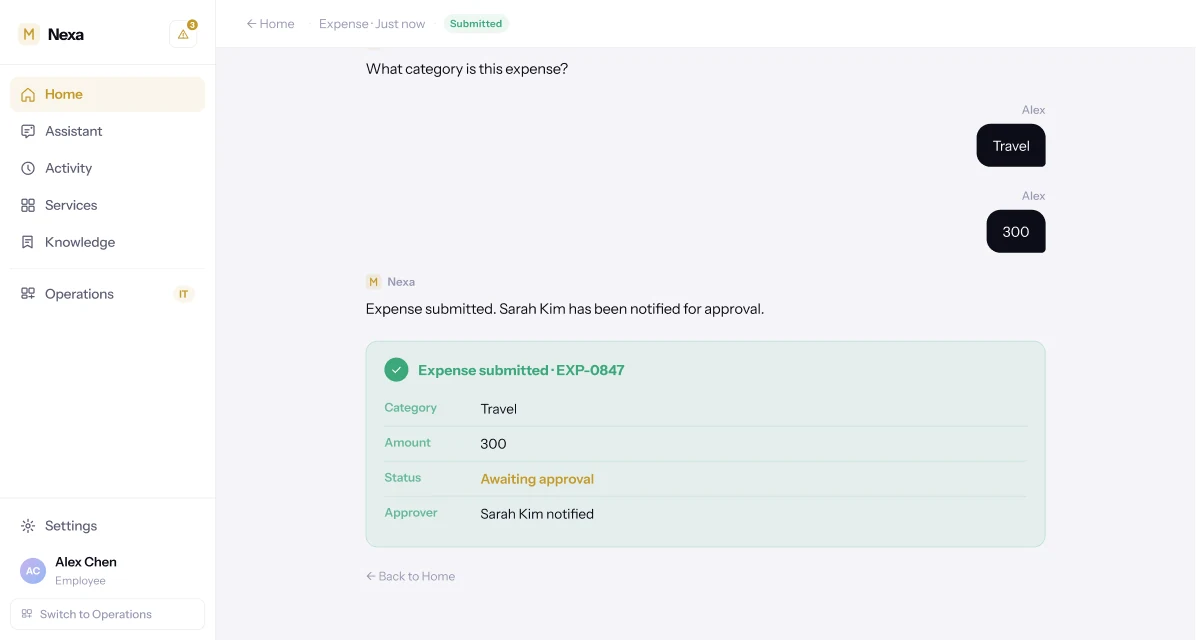
An expense claim is four short turns — category, amount, a summary with the approver already named, and a submitted state carrying its own reference number — not a multi-field form with a submit button at the bottom.
Nexa names Sarah Kim as the approver before the claim is even sent, because that's exactly the moment an employee wants to know it.
Employees have Nexa. Operations has Nexa too.
Not two products stitched together with a shared login — the same account, the same intelligence, read from whichever side of the organisation is looking.
Employee asks. Operations approves. Both are Nexa.
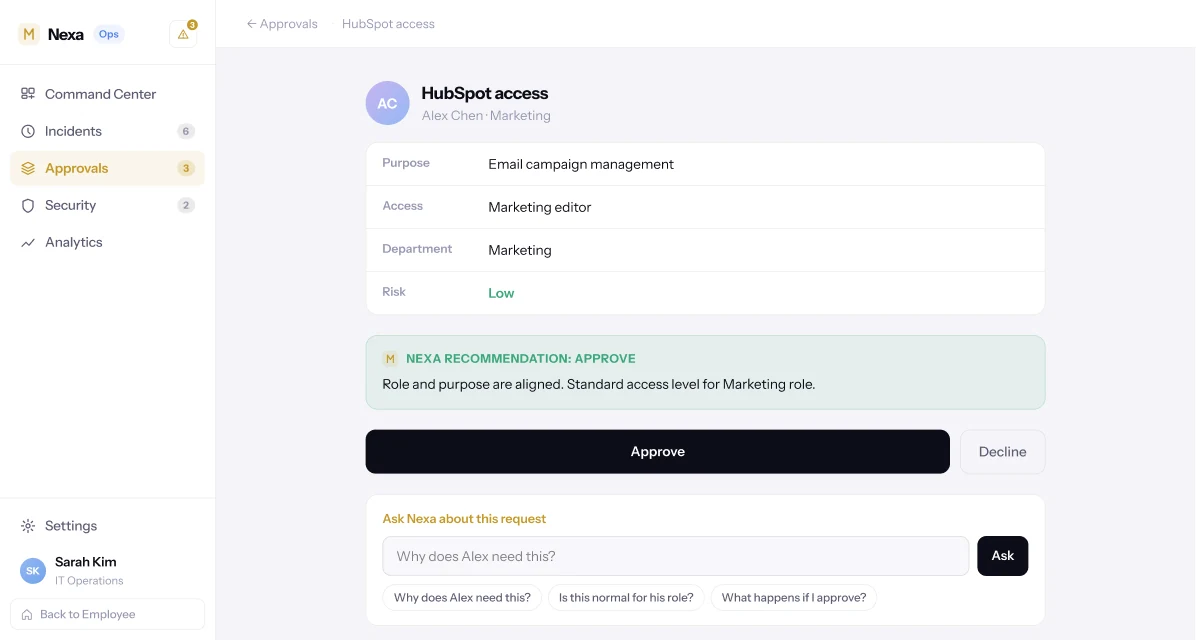
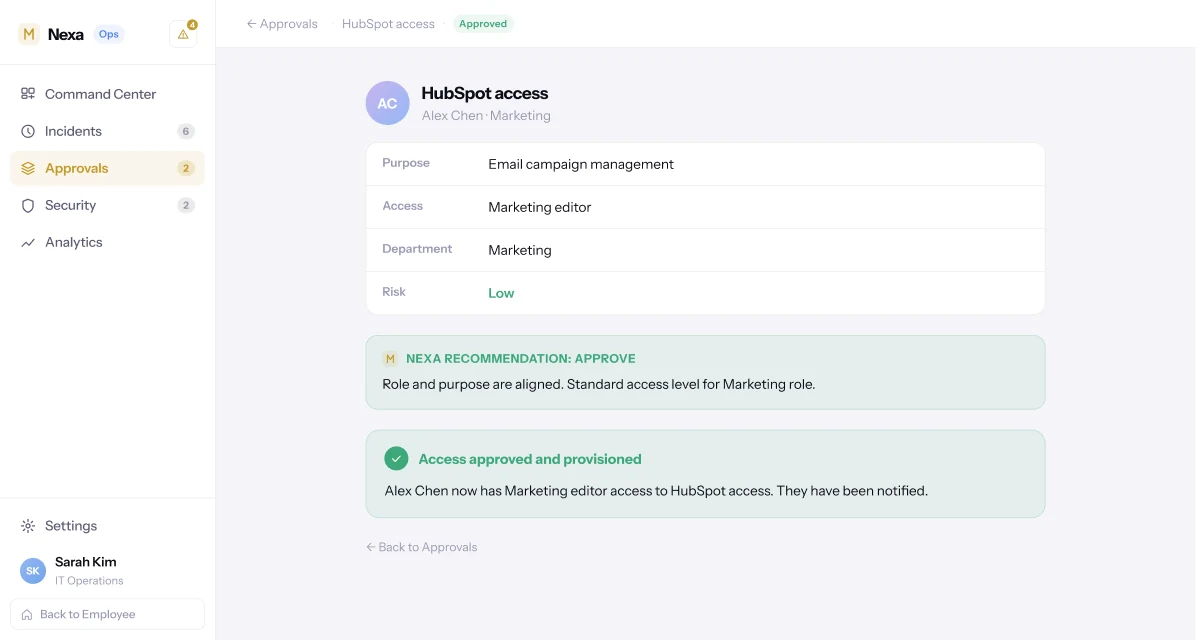
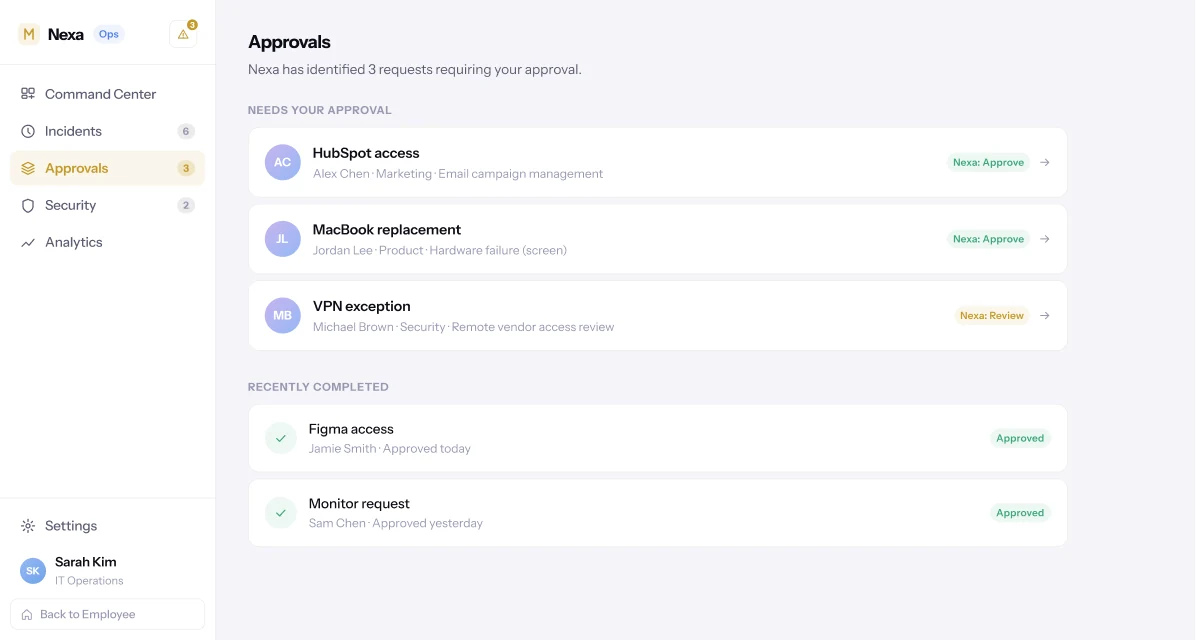
The HubSpot request an employee makes on their side of Nexa is the same request an approver sees on theirs — purpose, access level, department and a recommendation already reasoned out, not a bare name and a button.
Approve it, and provisioning and approval happen as one action: the employee's access exists, and they've been told, before the approver has closed the tab.
The briefing a person would otherwise have had to compile.
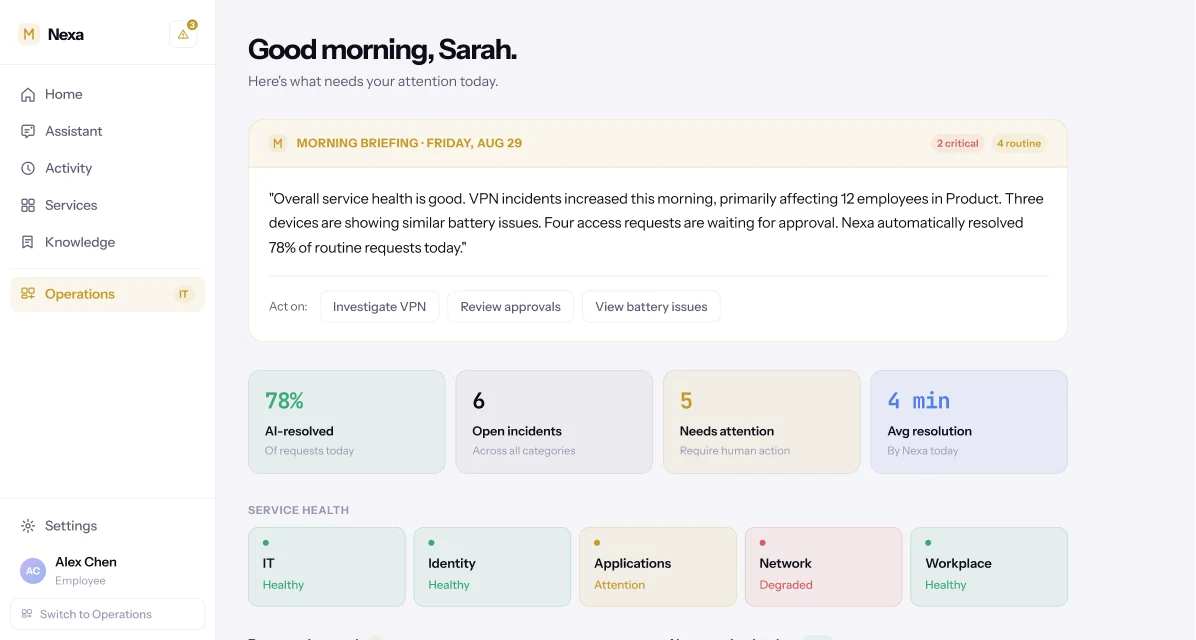
Operations doesn't open on a wall of dashboards. It opens on a morning briefing, written in a sentence: what's critical, what's routine, which team is affected, what Nexa already resolved without being asked.
Stat tiles and a service-health row sit underneath for anyone who wants the numbers behind the sentence.
Reporting a problem shouldn't feel like filing a tax return.
On the employee side, describing a problem — a slow laptop, a dropped VPN connection — starts an investigation, not a category picker: identify the device, check its health, check memory and recent changes, check security status, each step ticked off as it completes.
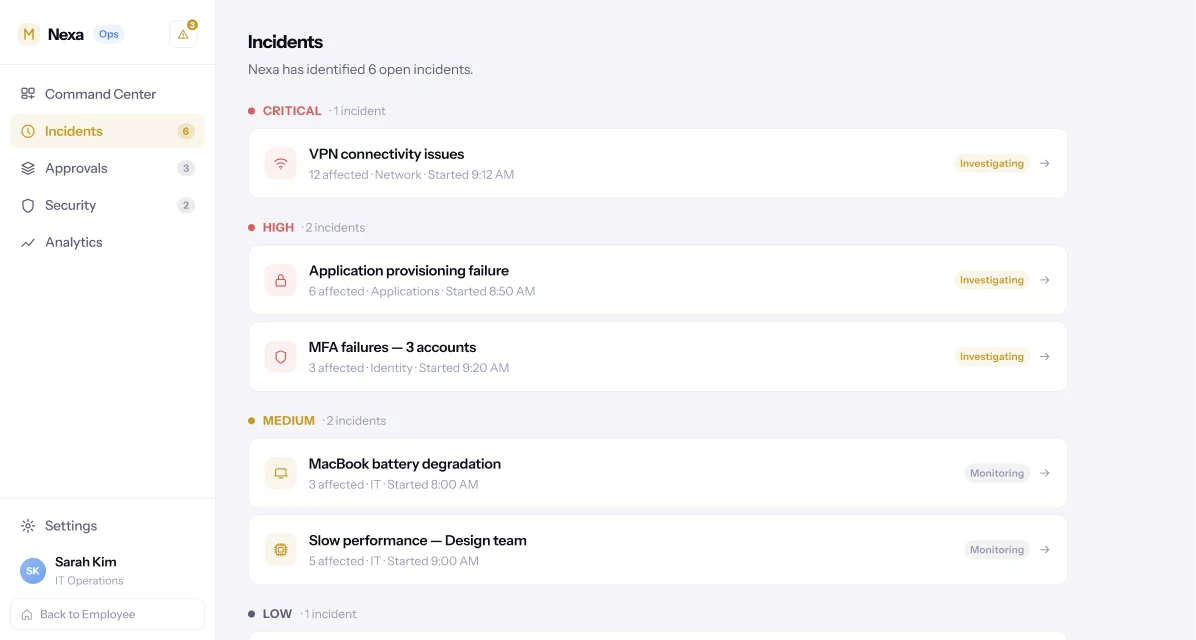
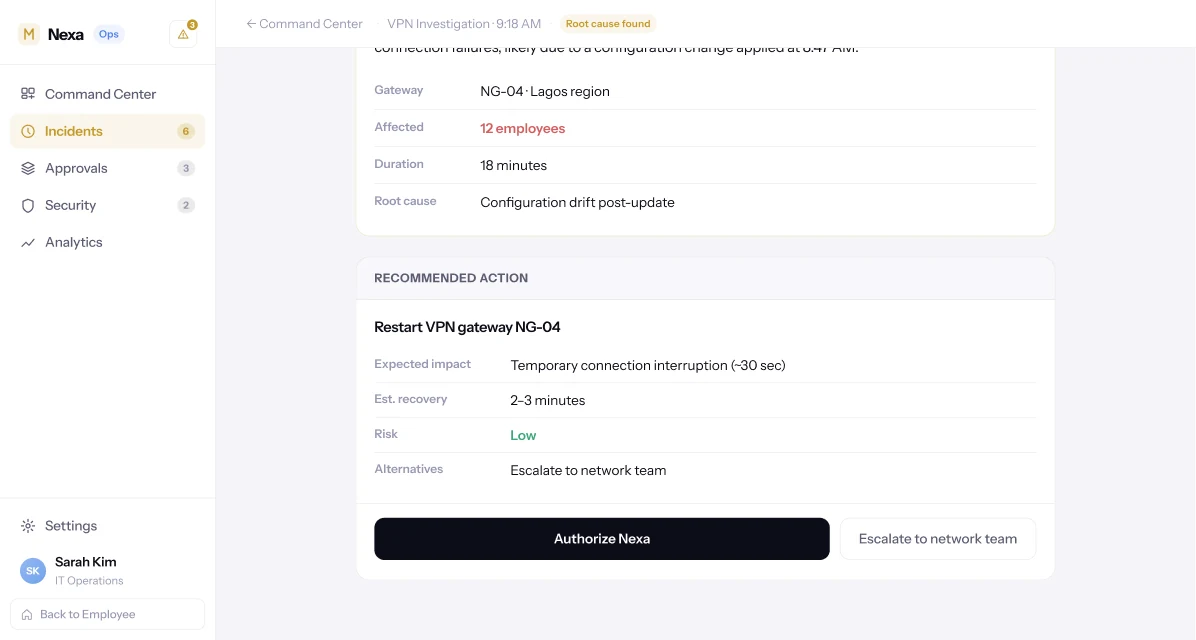
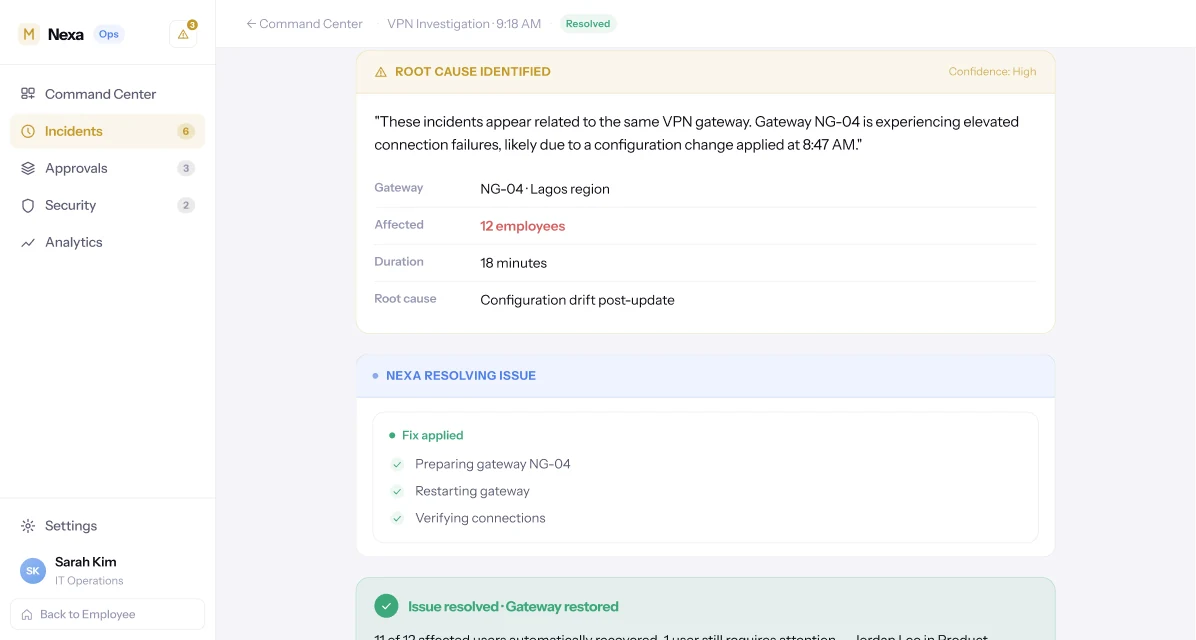
On the operations side, that same class of problem arrives already diagnosed: six open incidents grouped by severity, and opening one shows what Nexa checked, what it concluded — a configuration change on gateway NG-04, 12 people affected — and a specific, low-risk recommendation. Authorise it, and 11 of 12 recover automatically, with the steps shown, not just the outcome.
Triage instead of noise. Insight instead of a chart.
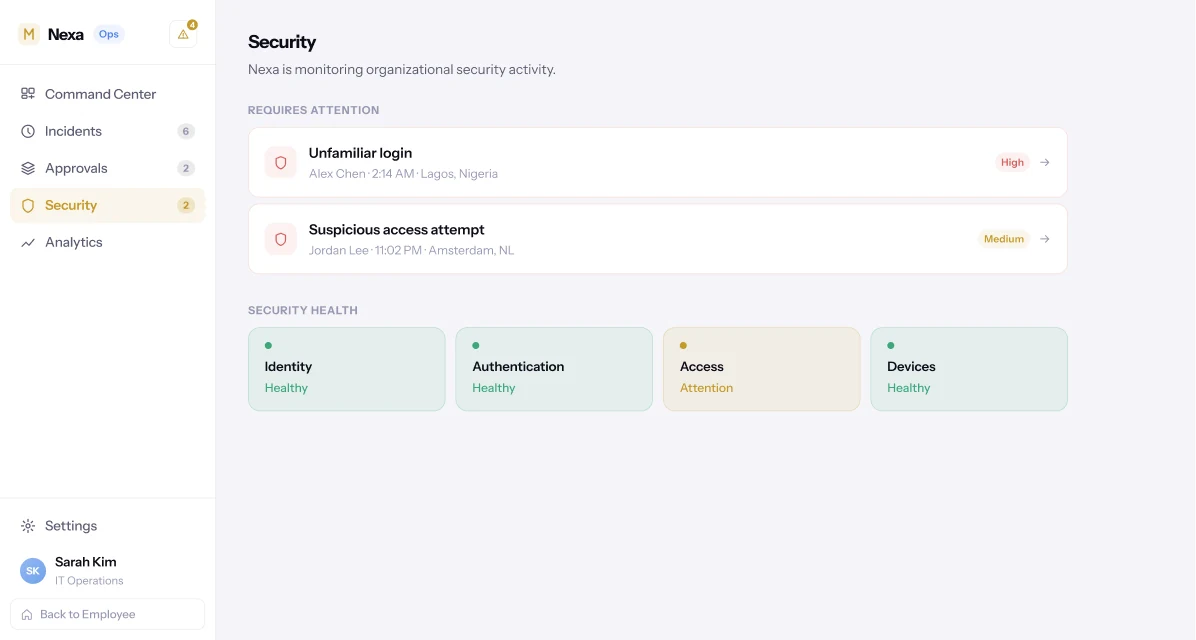
Security surfaces two events worth a human's attention — an unfamiliar login, a suspicious access attempt — with the detail that made them worth flagging, rather than a stream every event has to be manually read out of.
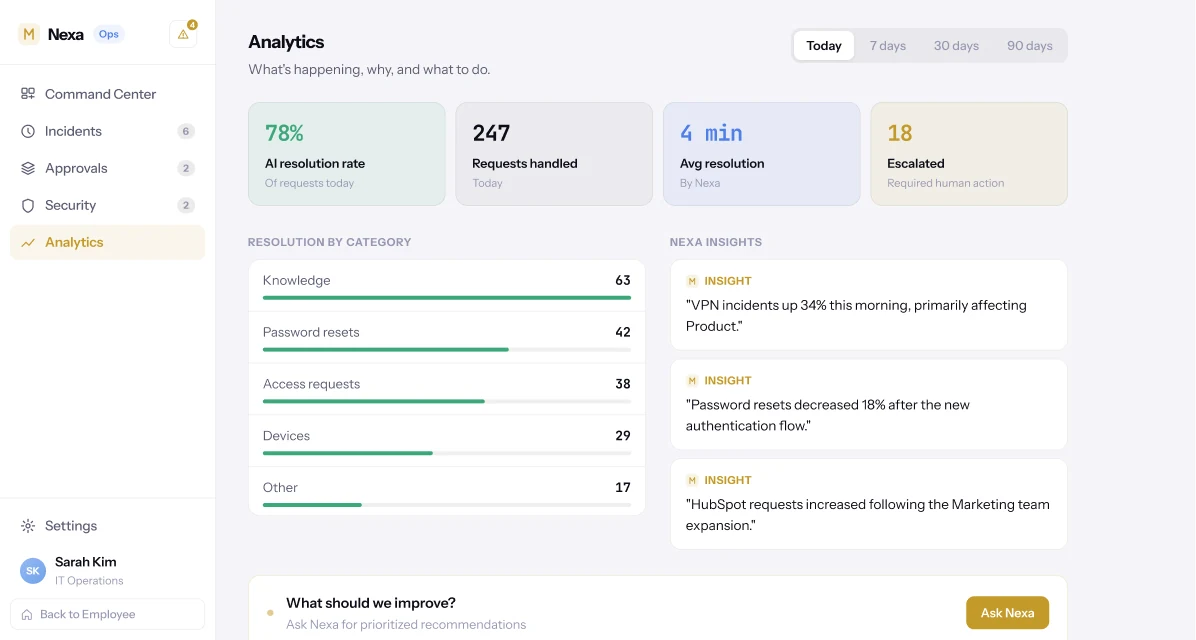
Analytics closes the same distance between data and decision: not just that VPN incidents rose 34% this morning, but that they're concentrated in the Product team, next to a prompt to ask what to do about it.
The organisation should notmake you think like the software.
The software should understand how people think.
Nexa adapts to how your organisation is structured, how your teams work, which tools you use, which policies you have, how approvals happen, who has responsibility, how your people communicate — and how work actually gets done.
The organisation doesn't need to adapt to Nexa. Nexa adapts to the organisation.
Not a deck. A product you can open.
Product design system
Colour, type, spacing and components, defined once and shared by both sides of the product.
Employee home & Ask Nexa
The conversational core, quick actions, proactive alerts and the Assistant history.
Guided request flows
Access, equipment, expenses and facilities, all built from the same one-question-at-a-time pattern.
Services & Knowledge
A browsable department index and a searchable, sourced knowledge base.
Activity tracking
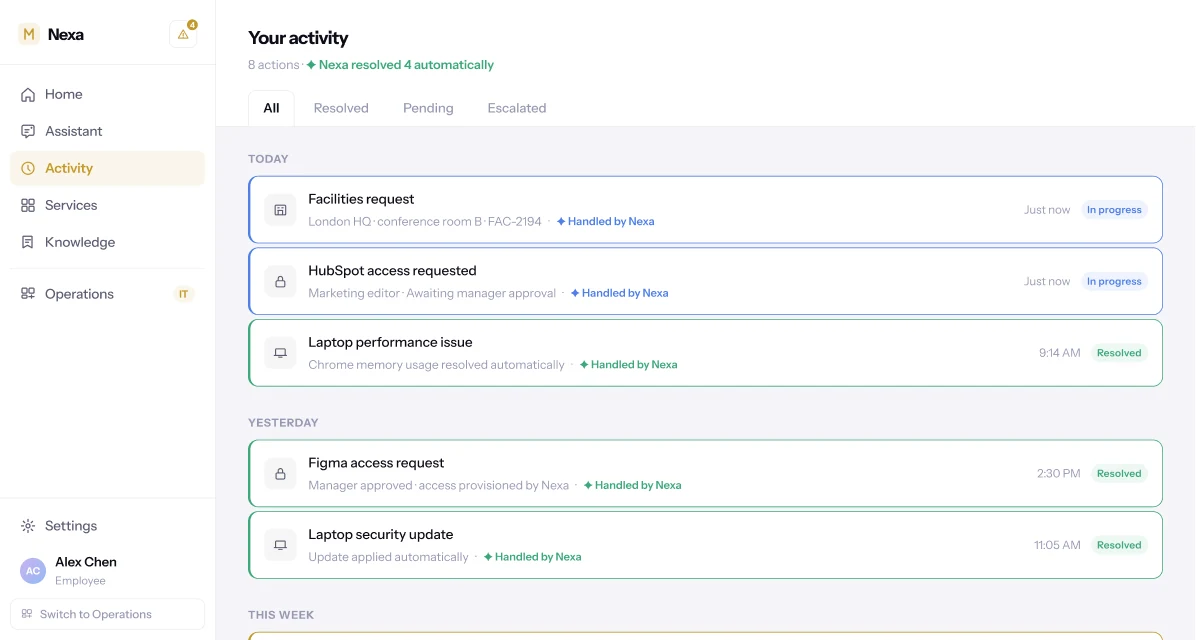
Every request in one list, filterable by resolved, pending and escalated.
Operations Command Center
A daily briefing, service health and the stats behind both.
Incidents & approvals
Grouped incidents, AI-recommended fixes, and approvals with context attached.
Security & analytics
Triaged security events and an insights feed that pairs findings with next steps.
Five decisions, in order.
- 01
Design the interaction model first
Before any screen, we mapped the traditional path — department, system, service, form, wait, follow up, track — against what a single conversational interface could collapse it to. Everything after that was building toward the shorter list.
- 02
Treat approvals as UI, not paperwork
An approver's decision is only as good as the context behind it. We designed the recommendation, the risk read and the "ask Nexa why" box as part of the approval itself, not a separate reporting layer.
- 03
Give the AI a visible trail
Every investigation — a slow laptop, a VPN outage — shows its steps as they complete, not a spinner. Trust in an AI-native interface comes from watching it work, not from being told to believe the output.
- 04
One system, two vantage points
Employee and Operations are the same account and the same Nexa, not two products stitched together — a request an employee makes is the exact request an approver sees, with nothing translated in between.
- 05
Design the calm, not just the capability
Generous whitespace, restrained colour and soft surfaces were a deliberate choice against enterprise software's usual density — capable should not have to mean heavy.
The philosophy, as seven rules.
One intelligent interface
Employees interact with Nexa rather than navigating organisational complexity themselves.
Context before questions
Use what the organisation already knows before asking the person in front of it.
Action over navigation
Every screen moves a request toward completion rather than toward another system.
AI with visible reasoning
When Nexa recommends something, the person reading it can see why.
Automation with control
Nexa can act on its own, but never past the approvals and policies governing the action.
Organisational memory
A closed ticket isn't a deleted one — past incidents and decisions stay available to draw on.
Proactive assistance
Nexa surfaces what's worth knowing before anyone has to think to ask.
Two sides. One system.
Same organisational power. A completely different experience.
Nexa exists as a working system: one conversational interface across IT, people, security, finance and facilities, with the organisation's roles, permissions, policies and history sitting behind every answer it gives. It was designed and built by Creativnerd.
Behind one conversation sits the employee's role, their team, the organisation's systems, policies, workflows, permissions and history. The complexity doesn't disappear. Nexa simply takes responsibility for navigating it — for the employee asking a question, and for the operator keeping the whole organisation running underneath it.
This is what a few days at Creativnerd looks like.
Nexa is one of ours. If you have a product in your head that deserves the same treatment, that is the conversation we like having.
See more of our workGot one of your own?
Tell the Concierge what you're building. It will tell you what it would take, and roughly what it would cost — before you speak to anyone.